
Over the next few days, we will be migrating from our old training portal, CourtsNet, to our new training portal, LearnWorlds,
LifeSpring School of Ministry.
The process will take place automatically on our new website and will require minimal effort from you.
So, this is just a quick rundown of what will be taking place over the next few days:
A. What groups are being migratedB. The timing of the migration stagesC. What you may need to do in response (if anything)
D. What if Your Account is Missed?The migration will take place in four groups:
- Current LSOM students (2025)
- New LSOM students (2026)
- Creation of accounts for those students currently on CourtsNet
- Adding all previously enrolled CourtsNet classes into your new LearnWorlds account
- Stages 1 and 2 will take place first and will be executed tomorrow, which is the LearnWorlds launch day.
- Stage 3 will then take place: the creation of new accounts for existing CourtsNet students, scheduled for on or shortly after launch day, December 27.
- Stage 4 will take longer, as we will need to add each individual course to your newly established LearnWorlds account.
Please be patient with us during this process and do not immediately email support if you notice courses missing. Support capacity is limited during this migration, so response times may initially be slower than usual.
- When your account is activated, you will need to set your password and complete a quick survey (usually indicated by the first email you receive).
- Please check your junk or spam email folder to make sure the message was not filtered; this is a good practice in general. When you see our email, follow the instructions in the automatically sent message and complete the brief survey.
- All additional emails will let you know which course content is being restored to your new LearnWorlds account.
- That is all you will need to do.
If, for some reason, your account is missed:
• Check your junk or spam folder first and follow the instructions in any emails you find.
• If you still cannot find an email, go to our website (
https://lifespringsom.com) and try logging in with your last known email address.
• Try using the “Forgot password” feature with that last known email address (shown in the red box below).
• Please do NOT use the “Create Account” option at this time (shown in the blue box below).
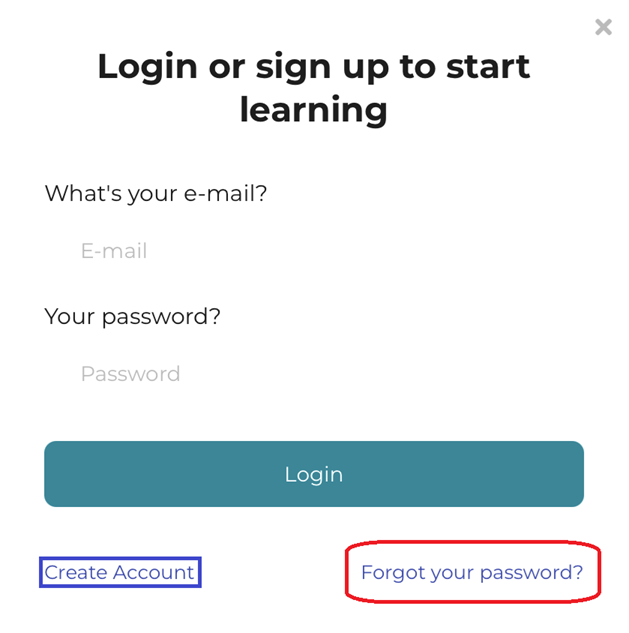
If you do not know which email address is associated with your account, please email lwsupport (details below), and we will attempt to look it up for you or confirm whether you have been migrated. We will respond as soon as we can, but
please be aware that support capacity is limited during this migration.
Please do NOT create a second account, as it will make things more complicated for you.
For all course-related LSOM, CourtsNet, and AfterCare non-technical questions, please continue to use our regular email address:
lsom@courtsofheaven.net or use the form below.